
7 Things to Know Before You Buy a Medical Alert System Online
Last Updated: October 25, 2026
Quick Summary
To buy a medical alert system online, confirm four things first: whether a live operator or only family is alerted, whether the device uses landline, cellular, or Wi-Fi, the total cost including equipment and activation fees, and the contract and return terms. A medical alert system is a wearable help button that connects the user to an emergency operator.
- Monitored systems connect to a 24/7 response center; unmonitored devices only sound an alarm or call family.
- Monthly monitoring runs about $20 to $45 for in-home and roughly $40 to $60 for mobile GPS.
- Ask each seller for the total first-year cost in writing, itemized by all five cost lines.
- Standard Medicare generally does not pay for medical alert devices or their monitoring fees.
- Test the system after it arrives: time how long until an operator answers the help button.
Table of Contents
- What to Check Before You Buy a Medical Alert System Online
- Medical Alert System Cost: What the Monthly Fee Actually Covers
- Best Medical Alert Systems 2026: A Side-by-Side Buying Guide
- Medical Alert Systems Without Monthly Fees: What You Give Up
- Medicare Coverage for Medical Alert Systems and Other Benefit Options
- How to Vet Online Sellers, Coverage, and Device Security
- Comparing Your Shortlist on Cost and Coverage
- Frequently Asked Questions
What to Check Before You Buy a Medical Alert System Online
Buying a medical alert system online means choosing between monitored devices that connect to a 24/7 response center and unmonitored gadgets that simply sound an alarm. That distinction matters more than any spec sheet. At ElderLivingHub, we review senior care technology for families making exactly this decision.

Here is what to confirm first:
- Monitoring type: Is a live operator answering the emergency button, or does the device only alert family?
- Connectivity: Does the system use a landline, cellular connection, or Wi-Fi, and does your parent’s home support it?
- Total cost: Monthly fee plus equipment cost plus any activation fee, not just the advertised starting price.
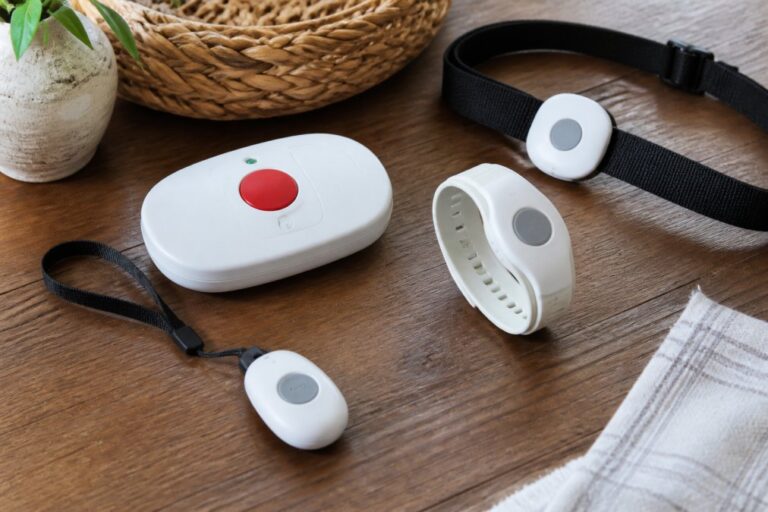
A medical alert system is a personal emergency response system: a wearable pendant, wristband, or mobile device with a help button that connects the user to an emergency operator. Without those four checks, you’re guessing. With them, you can buy a medical alert system online with confidence.
Medical Alert System Cost: What the Monthly Fee Actually Covers
Medical alert system cost breaks into five line items, not one: the monthly monitoring fee, equipment cost, activation fee, shipping, and any add-on such as fall detection. The monthly fee is not device rental. It funds the monitoring center, the operators staffing it around the clock, two-way communication through the device speaker, and caregiver notification when an alert fires. Comparing advertised starting prices without the other four lines is how families end up surprised at checkout.
Here is what each line item typically looks like. Treat every figure as a starting point to confirm with the seller, not a quote.
| Cost line | Typical range | What to confirm |
|---|---|---|
| Monthly monitoring | About $20 to $45 for in-home; roughly $40 to $60 for mobile GPS | Whether the price is promotional, and what it reverts to after month one |
| Equipment | $0 to about $150, depending on whether the device is leased or purchased | Whether the device must be returned at cancellation and what a lost or damaged unit costs |
| Activation | $0 to about $50 | Whether activation is waived on annual prepay |
| Shipping | $0 to about $15 | Whether expedited shipping is available and who pays return shipping |
| Fall detection add-on | Roughly $5 to $15 per month | Whether the add-on requires a specific pendant or mobile unit |
A common pattern is a low headline monthly rate paired with a one-time equipment charge and a separate activation fee, which pushes the real first-year cost well above twelve times the advertised rate. Run the math before you compare:
First-year total = (monthly fee + add-ons) × 12 + equipment + activation + shipping
Worked example using hypothetical figures: a monthly plan with fall detection, an equipment charge, an activation fee, and shipping will have a total first-year cost. The same plan advertised at only a monthly rate will look lower until you add the other lines.
- In-home systems with a landline connection usually carry the lowest monthly fee, but they lock your parent to one room’s range and depend on a phone line that many households no longer have.
- Cellular and mobile systems cost more because they include GPS tracking and on-the-go protection, and they carry their own cellular line charge inside the monthly fee.
- Fall detection is often a paid add-on, not a standard feature, and it may only be available on one device in the lineup.
Ask each seller for the total first-year cost in writing, itemized by the five lines above. If a listing shows only a monthly figure, the equipment and activation charges are probably still coming.
For a deeper cost comparison across plan tiers, our breakdown of affordable medical alert systems covers monthly costs and coverage options side by side.
Best Medical Alert Systems 2026: A Side-by-Side Buying Guide
The best medical alert systems in 2026 differ mainly in monitoring coverage, battery life, and contract flexibility. Prices shift, so confirm current rates with each provider before ordering.
MobileHelp Classic
MobileHelp Classic is a monitored system. The National Council on Aging has described MobileHelp as an affordable option, which fits families prioritizing a lower monthly fee. What the listings don’t spell out: which equipment is included at that price and whether contract terms apply. Ask before you order.
Bay Alarm Medical
Bay Alarm Medical advertises plans with no activation fees and no long-term contracts stated on its pricing page. That combination is rare and worth weighing seriously. The catch is that the starting price may not cover every system type, so confirm which plan and equipment the figure applies to.
Medical Guardian
Medical Guardian was named best overall medical alert system in the National Council on Aging’s 2026 review, which highlighted long battery life and one of the fastest average response times. If your parent forgets to charge devices, battery life alone can justify the choice. Request a quote for current plan pricing.
Lively Mobile2
Lively Mobile2 is an all-in-one mobile device sold through Best Buy, with service activated by phone through Lively Health & Safety Services. Buyer feedback in the Best Buy listing praises ease of use and battery life. Budget for both the device price and the service-plan cost before buying.
Medical Alert Systems Without Monthly Fees: What You Give Up
Medical alert systems without monthly fees exist, but they are a different product category. You trade professional 24/7 monitoring for zero recurring cost. (Source: the Federal Communications Commission (FCC))
That trade-off works for some households and fails for others. If your parent has a family member nearby who reliably answers the phone, a self-monitored device can be reasonable. Our guide to medical alert systems without monthly fees explains how self-monitored devices work and where they fall short.
Medicare Coverage for Medical Alert Systems and Other Benefit Options
Medicare coverage for medical alert systems is limited: standard Medicare generally does not pay for medical alert devices or their monitoring fees, because they are considered convenience items rather than medical equipment. Some Medicare Advantage plans may offer related benefits, so check your parent’s specific plan documents rather than assuming.
Other routes families use:
- Medicaid waivers: some state programs fund personal emergency response systems for eligible recipients.
- Veterans benefits: the VA may assist eligible veterans through its programs; confirm eligibility directly with the VA.
- Local assistance programs: area agencies on aging sometimes help with costs.
Verify every option with the administering agency before counting on it. Benefit rules change, and eligibility depends on individual circumstances.
How to Vet Online Sellers, Coverage, and Device Security
Vetting an online seller comes down to four checks: confirm what you are actually buying, verify coverage at your parent’s exact address, read the privacy and data-sharing terms, and know the return path before you pay. Marketplace listings can be legitimate, but they mix monitored systems, unmonitored alarms, and caregiver pagers under similar product names, and the listing copy rarely makes the difference clear.
Step 1: Confirm what the listing actually sells
A monitored medical alert system connects the help button to a 24/7 response center staffed by trained operators. An unmonitored device sounds a local alarm or calls a family contact. A caregiver pager only notifies someone in the home. Before ordering, confirm in writing:
- Who answers the button, and whether that answer is a professional monitoring center or a family phone
- Whether the monthly fee is paid to the seller or to a separate monitoring company
- Whether the seller is the manufacturer, an authorized retailer, or a third-party marketplace reseller
A common pattern in marketplace listings is a low device price with service activated separately by phone. That is not necessarily a bad deal, but budget for the plan and confirm who handles support when the button is pressed at 2 a.m.
Step 2: Verify coverage at the street address
Cellular coverage maps are marketing tools, not guarantees. Coverage at the ZIP code level can hide dead spots inside a specific home, especially in basements, rural areas, and steel-frame buildings. Before ordering:
- Call the provider and read the full street address, not just the ZIP code
- Ask which cellular carrier the device uses and whether the device falls back to Wi-Fi
- Ask how the device behaves during a power outage and how long the backup battery lasts
If your parent lives in a low-signal area, a landline-based in-home system may be more reliable than a mobile unit, even though it limits range.
Step 3: Read the privacy and data-handling terms
GPS-enabled devices and caregiver apps collect location, alert history, and sometimes health-related notes. Before you create an account:
- Ask what data the device collects and who can see it
- Confirm whether location data is shared with third parties or advertisers
- Check whether the caregiver app requires two-factor authentication
Step 4: Know the return and setup path before you pay
Setup matters as much as purchase. After the box arrives, test the system rather than trusting the manual:
- Charge the device fully and confirm the low-battery alert works.
- Press the help button and time how long until an operator answers.
- Confirm the operator has the correct address, call-back number, and medical notes.
- Verify each caregiver contact receives the notification.
- Unplug the base unit to test the backup battery, then plug it back in.
- Walk the perimeter of the home with a mobile unit and note any dead spots.
Keep the original packaging until the trial window closes. Ask for the return policy and trial window in writing, including who pays return shipping and whether activation fees are refundable. Our step-by-step setup guide for medical alerts covers testing the device and configuring emergency contacts. And if you’re unsure whether the reviews you’re reading are independent, our explainer on whether medical alert reviews are independent shows how to spot biased listings and check endorsement guidelines.
Comparing Your Shortlist on Cost and Coverage
Put your finalists in one table before deciding. The columns that matter most are the ones sellers bury: total monthly cost with add-ons, contract length, and coverage at your parent’s address.
| System | Reported Starting Price | Stated Contract Terms | Best For |
|---|---|---|---|
| Bay Alarm Medical | $24.95/month | No activation fees, no long-term contracts stated | Families wanting flexibility |
| MobileHelp Classic | $29.95/month | Not confirmed in listings | Lower monthly starting price |
| Medical Guardian | Not published in sources reviewed | Not confirmed in listings | Battery life and response speed |
| Lively Mobile2 | Device and plan priced separately | Activation by phone | All-in-one mobile device |
Two rules close the deal. First, call and confirm coverage at the exact address. Second, ask for the total first-year cost in writing, including equipment and any add-ons. For the full category hub of reviews and comparisons, browse our medical alert system reviews.
Frequently Asked Questions
Does Medicare cover medical alert systems?
Original Medicare generally does not pay for a medical alert system because it treats the device as convenience equipment rather than durable medical equipment. Some Medicare Advantage plans offer over-the-counter or flex benefits that families can put toward a device, and Medicaid waivers in some states may help. Check your specific plan documents or call the plan directly before you buy a medical alert system online, since coverage varies widely by plan and state.
Can you get a medical alert system without a monthly fee?
You can find medical alert systems without monthly fees, but most are unmonitored. That means the device dials a family member or a preset number instead of a 24/7 monitoring center. If no one answers, no one dispatches help. Monitored systems almost always carry a subscription because someone staffs the response center around the clock. Decide whether you need professional monitoring or family-only alerts before you shop.
Can you buy a medical alert system online safely?
Yes, if you verify the seller first. Buy from the provider’s own site or a known retailer, confirm the return window and cancellation policy in writing, and check that the device works on the cellular network in your parent’s home. Ask whether activation fees apply and whether the monthly price is locked or promotional. Reading the contract terms before checkout prevents most surprises after the device arrives.
What should you compare before buying a medical alert system?
Compare four things: total monthly cost including equipment and activation, whether monitoring is included, how the device connects (landline, cellular, or GPS), and fall detection availability. Also check battery life, water resistance, and the cancellation policy. A low starting price with a long contract can cost more over two years than a higher monthly rate you can cancel anytime. Build a simple two-year cost estimate for each option.
The hardest part of buying online isn’t finding devices; it’s cutting through pricing that hides add-ons and coverage claims that don’t hold at your parent’s address. ElderLivingHub exists to close that gap, with independent reviews, total cost of ownership analysis, and ease-of-use evaluation written for families, not sales pages. Start with our comparisons and buy with the confidence that the device on your parent’s wrist will actually work when it matters.