
Do Medical Alert Systems Actually Work? An Honest Look
Table of Contents
- Do Medical Alert Systems Actually Work? The Short Answer
- How Do Medical Alert Systems Work, Step by Step
- Medical Alert System Fall Detection: What It Can and Cannot Catch
- In-Home vs. Mobile Medical Alert Systems: Matching the System to Daily Life
- Medical Alert System Limitations You Should Know Before Buying
- How to Choose a System and Test It Before You Rely On It
- Frequently Asked Questions
Last Updated: October 18, 2026
Do Medical Alert Systems Actually Work? The Short Answer
Yes, medical alert systems work, but only when the right system matches the person and situation. They do not prevent emergencies; they shorten the gap between a fall or medical event and the arrival of help.
A medical alert system is a chain, and the weakest link decides the outcome. A pendant with no signal in the bathroom is useless, and so is a button left on the nightstand.
A medical alert system works best as a bridge to help, not a replacement for it. Judge any system by three things: signal coverage where the person lives, whether they will wear it, and how fast the monitoring center reaches a real person.
How Do Medical Alert Systems Work, Step by Step
A medical alert system is a wearable or home-based device that connects a person to a 24/7 monitoring center with one press of a help button, sending a signal over a landline, cellular connection, or internet link. A representative then speaks through the unit and arranges help. What separates a system that works from one that only looks like it works is what happens in the sixty to ninety seconds after the press.
The full chain looks like this:
- The user presses the button on a pendant, wristband, or wall unit. Most pendants require a deliberate press-and-hold of about one to two seconds to avoid accidental activation; a few use a single tap and are easier to trigger by bumping a counter.
- The base unit or wearable dials out over its connection type. A landline system seizes the phone line; a cellular base uses its own SIM; an internet-linked unit routes over Wi-Fi. Each has a failure mode, an unplugged landline, a basement cellular base with one bar, or a Wi-Fi router that reboots during a storm.
- The monitoring center answers. Well-run centers answer within a few rings, and the published industry benchmark is under 60 seconds to a live operator. Treat any number as a target, not a guarantee, and ask the provider their average answer time over the last quarter.
- The representative speaks through two-way communication. The operator identifies themselves, asks if the user needs help, and listens. Audio quality depends on the base unit’s speaker and microphone, not the pendant, so a user in a far room may hear the operator but not be heard in return.
- The representative assesses and dispatches. Depending on the answer, or the silence, the operator routes to emergency services, a family contact, or a neighbor. That routing order is set in the user’s profile and is the most important thing to review after setup.
From Button Press to First Responders: The Response Timeline
Most systems aim to connect the user to a live representative within seconds, then dispatch. A realistic end-to-end picture:
- 0-5 seconds: the button press registers and the base unit or wearable begins dialing.
- 5-60 seconds: the monitoring center answers and the operator speaks. This is the widest variable; a busy center during a regional event can push toward the top of that range.
- 1-3 minutes: the operator confirms the situation, verifies the address, and decides whether to call emergency services, a family contact, or both.
The honest caveat: a system shortens the gap between the emergency and the call for help, not the ambulance ride. Families expecting a ten-minute total timeline are measuring the wrong thing. Ask each provider to walk you through their process in writing, and confirm whether they call the user first or dispatch immediately when no one answers.
What Happens When the User Cannot Speak
This is where voice quality and escalation protocols matter most, and where a cheap plan quietly fails. If the user presses the button but cannot respond, the center should follow a set escalation path rather than assume all is well. A common pattern:
- Try the device’s two-way audio and listen for any sound, a groan, a tap, background noise.
- Call the home phone or the user’s cell if one is on file.
- Contact the first listed family contact or neighbor, in the order the user set.
- Send emergency services if no one confirms the person is safe within the center’s protocol window.
The failure mode to watch for is a center that stops at step one and logs a ‘no response’ without escalating. Ask any provider: if I press the button and say nothing, what do you do, and how long do you wait before you call 911?

A monitoring plan that answers fast but escalates slowly is worse than one that answers a few seconds later and follows through. Test the no-response path on a scheduled call before you rely on it.
Medical Alert System Fall Detection: What It Can and Cannot Catch
Medical alert system fall detection uses motion sensors to spot the sudden drop and impact pattern of a fall, then triggers an automatic call for help. It is a backup, not a guarantee. It cannot catch every fall, and it will sometimes trigger on a dropped device or a quick sit-down.
What it handles well:
- A hard fall with a clear drop and impact
- A fall where the user is dazed and cannot press the button
What it misses:
- A slow slide down a wall or out of a chair
- A fall cushioned by furniture or carpet
- Any event where the sensor is not worn
Treat fall detection as a safety net under the button, never as a replacement for it.
In-Home vs. Mobile Medical Alert Systems: Matching the System to Daily Life
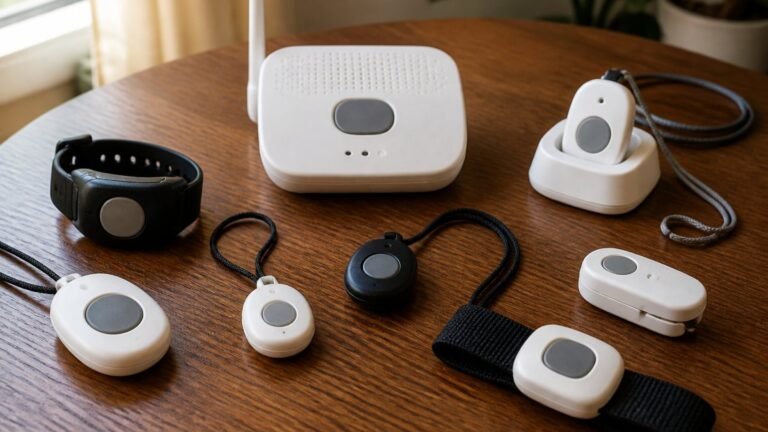
In-home systems use a base unit with a long-range wearable button that works throughout the house. Mobile systems use cellular and GPS so the user can request help on the go.
| Feature | In-Home System | Mobile System |
|---|---|---|
| Best for | People who stay close to home | Active users who leave the house |
| Connection | Landline or cellular base | Cellular with GPS |
| Coverage | Home and yard range | Wherever there is cell signal |
| Battery care | Base plugged in, button charged | Device charged daily |
| Watch out for | Dead zones in the home | Gaps in cellular coverage |
A common mistake is buying a mobile system for someone who rarely leaves home, trading reliable in-home range for coverage they will not use. The reverse is just as costly: an in-home system offers no protection on a walk to the mailbox.
Walk the whole home with the button during setup, including the bathroom, basement, and garage. Note any spot where the base unit cannot hear the button. That dead zone is where you may need a mobile system or an extra help button.
Medical Alert System Limitations You Should Know Before Buying
Every medical alert system has limits, and knowing them keeps expectations honest. The device cannot stop a fall or medical emergency, cannot guarantee a response if the user is unconscious and the device is not worn, and depends on power, battery, and signal. Here is why these limits bite and how to test for them.
The main limitations, with the mechanism behind each:
- Wearing compliance. A button in a drawer protects no one; the device only works if it is on the body when the event happens. Pendants worn under clothing, left on a nightstand during sleep, or set down during a shower are the most common real-world failures. Shower use is high-risk, so check the water resistance rating (look for an IP rating) before relying on it there.
- Charging habits. Mobile devices need daily charging, and battery life drops with heavy use and age. A device that dies at 4 p.m. because it was not docked is a silent failure. Tie charging to an existing habit, such as plugging it in with the evening news.
- Coverage gaps. Cell and home dead zones both happen. An in-home base unit’s rated range, often a few hundred feet, shrinks through walls, floors, and appliances. A mobile device depends on cellular, which can be thin in basements, rural areas, and some building interiors. Neither gap announces itself; you find it by walking the home with the button.
False Alarms, Cancellations, and Escalation Protocols
False alarms are normal, and a good monitoring center handles them without friction. The user should be able to cancel by speaking to the representative or pressing a cancel command, and the center should confirm before standing down. If the user cannot be reached, the center should escalate rather than assume all is well. Ask each provider: how do I cancel a false alarm, and what happens if I do not answer?
A Practical Testing and Maintenance Checklist
The best way to know whether a system works is to test it like the emergency is real, on a schedule, not once at setup:
- Walk the whole home with the button, including the bathroom, basement, garage, and yard, and note any spot where the base unit cannot hear the press. That dead zone is where you may need a mobile system or an extra help button.
- Verify the connection type at the address, cell signal strength on the carrier the device uses, or a working landline, and re-check after any move, renovation, or router change.
- Test the button with the monitoring center on a scheduled call at least monthly, and confirm the operator has the correct address and contacts on file.
Costs and contracts deserve a close look alongside the testing routine. Pricing depends on the device, the monitoring plan, and the contract term, so ask for the total cost of ownership rather than the monthly headline. Check whether any insurance or benefits help cover the cost, and confirm the terms in writing, including the cancellation window and whether equipment must be returned. Medicare guidance on covered home health and safety services
National Council on Aging resources on aging in place
Put the monthly test on a calendar reminder and do it on the same day each month. A system that is tested is a system you can trust; one that was tested once at setup is a guess.
How to Choose a System and Test It Before You Rely On It
Choosing well starts with the person, not the product. Match the system to daily life, then test it like the emergency is real. Checklist before you commit:
- Confirm coverage in every room the person uses, plus the yard
- Verify the connection type works at the address (cell signal or landline)
- Check the battery life and charging routine
Costs and contracts deserve a close look. Check whether any insurance or benefits help cover the cost, and confirm the terms in writing. Medicare guidance on covered home health and safety services
For families comparing options, ElderLivingHub reviews medical alert systems with an eye on ease of use for seniors and remote caregivers.
The real challenge is not finding a device with a button.
Frequently Asked Questions
Do medical alert systems automatically detect falls?
Some do, but only systems with a dedicated fall detection feature. These use accelerometers and algorithms to notice a sudden drop and then check whether the wearer is still moving. Automatic fall detection is not perfect: it can miss softer falls, like sliding down a wall, and trigger on a device being dropped. Most systems still expect the user to press the button when they can. Treat fall detection as a backup layer, not a replacement for the help button, and test it after setup.
Can a medical alert system get help if the user cannot speak?
Yes, in most cases. When the button is pressed, the call connects to a monitoring center where a response representative speaks through the two-way speaker. If the user cannot answer, the representative follows an escalation protocol: they may try the device again, call family contacts or neighbors on the account’s contact list, and dispatch emergency services if needed. Make sure your contact list is current, because it is what the monitoring center relies on when the wearer cannot respond.
Do medical alert systems work outside the home?
In-home systems generally do not. Their base unit connects through a landline or cellular connection and the button works within a limited range of that base, so it will not help at the grocery store or in the yard. Mobile systems use cellular connections and GPS to work away from home, with coverage depending on the carrier’s network in that area. If your parent leaves the house regularly, an in-home system alone leaves a real gap; a mobile option or a hybrid setup closes it.
How much do medical alert systems cost?
Pricing varies by provider, equipment type, and whether you add fall detection or mobile capability, so check each company’s current rates directly rather than relying on a single figure. Beyond the monthly fee, ask about equipment charges, activation fees, and contract terms, since these are where hidden costs usually appear. Compare the total cost over a year, not just the monthly rate, and confirm whether the monitoring fee changes if you switch from in-home to mobile.