
Best Medication Reminder Clocks 2026: Top Picks Reviewed
Table of Contents
- Best Medication Reminder Clocks 2026: Comparison Table and Top Picks
- 1. ORKA Medication Reminder Clock: Best Overall Dedicated Clock
- 2. Marathon Digital Medication Reminder Alarm Clock: Best for Multiple Daily Alarms
- 3. MedCenter Pill Reminder: Best Medication Reminder Clock for Seniors Who Need Organization
- 4. MedMinder: Best Automatic Pill Dispenser for Elderly Users with Caregiver Oversight
- 5. TabTime Timer and e-pill TimeCap: Best Pill Dispenser with Alarm for Single Medications
- 6. Medication Reminder App for Seniors: When a Smartphone Beats a Clock
- Accessibility, Power Backup, and Schedule Edge Cases: What Competitors Miss
- Frequently Asked Questions
Last Updated: October 12, 2026
Best Medication Reminder Clocks 2026: Comparison Table and Top Picks
A medication reminder clock is a dedicated device that sounds an audible alarm and shows a visual alert at set times to prompt someone to take their medication.
The list below covers dedicated clocks, multi-alarm clocks, organizer-based systems, and automatic dispensers. We separate devices that only remind from devices that dispense or verify, because that distinction changes what you are buying.
| Device | Type | Best For | Alarm Capacity | Ongoing Cost |
|---|---|---|---|---|
| ORKA Medication Reminder Clock | Dedicated reminder clock | Most households | Not verified in our sources | One-time purchase |
| Marathon Digital Reminder Alarm Clock | Multi-alarm clock | Multiple daily doses | Four alarms | One-time purchase |
| MedCenter Pill Reminder | Organizer plus reminder | Users who need organization | Not specified in our sources | One-time purchase |
| MedMinder | Automatic pill dispenser | Remote caregiver oversight | Dispensing system | $75/month, three-year commitment |
| TabTime Timer / e-pill TimeCap | Single-medication timer | One bottle, one schedule | Not verified in our sources | One-time purchase |
| Smartphone app | App-based reminder | Tech-comfortable users | Unlimited | Usually free or low-cost |
A reminder clock tells you when to take a dose. A dispenser controls whether the dose is available. If the concern is accidental double dosing, you need the second category, not the first.
How We Evaluated These Medication Reminder Clocks
Two criteria carry more weight. First, alert reliability: an alarm that is easy to silence accidentally is worse than no alarm, because it teaches the user to dismiss it.
We also flag what a device cannot do. Several products sold as medication reminders are dementia clocks with a pill alarm bolted on, and their medication features are undocumented by the manufacturer.
1. ORKA Medication Reminder Clock: Best Overall Dedicated Clock
The ORKA Medication Reminder Clock earns the top spot because it is engineered as a medication device first, not a general-purpose alarm clock with a pill icon on the box.
What we like, in order of how much it matters:
- No smartphone, no account, no app. Setup is a physical task, which is what you want when walking a parent through it over the phone from three states away. There is no password to recover, firmware to update, or notification permission to re-grant after a restart.
- Single-purpose interface. Because it does not also try to be a weather station, photo frame, or Bluetooth speaker, there are fewer buttons to misconfigure and fewer ways for remote instructions to go wrong.
- It sits where the medication sits. A clock on the kitchen counter or nightstand is in the same room as the pill organizer. A phone is wherever the phone happens to be.
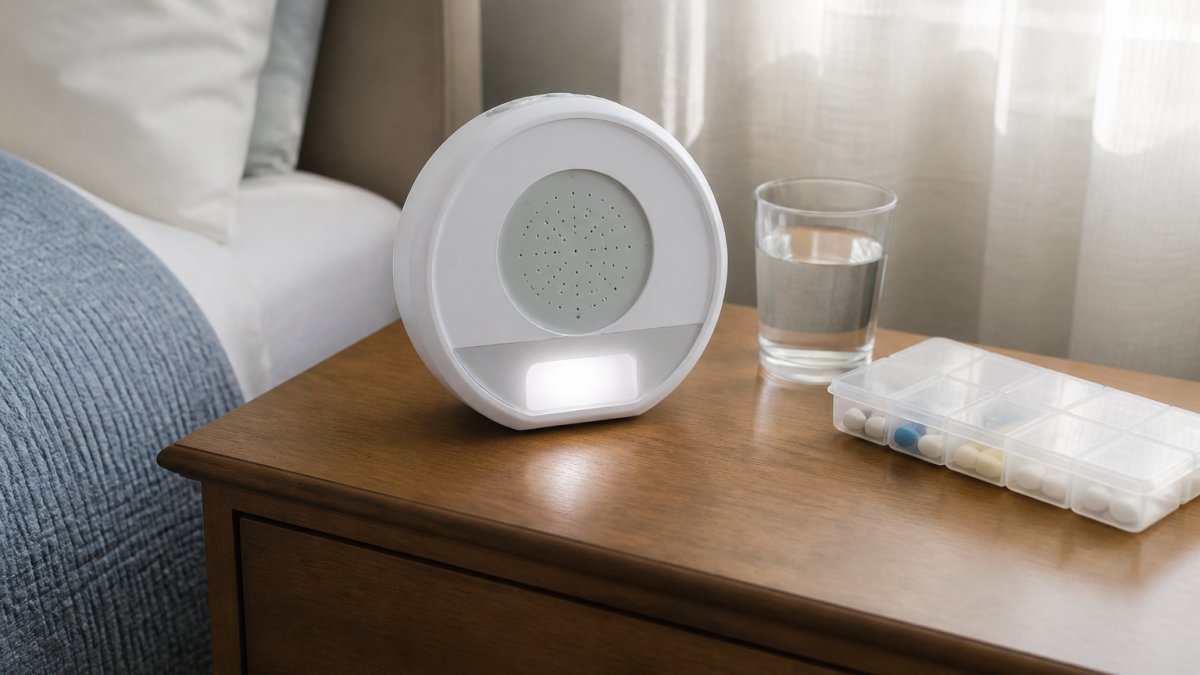
Before you buy any reminder clock, count the dose times, not the pills. A parent taking two pills twice daily needs four alarm slots, not two. Most returns happen because buyers counted medications instead of dose times.
2. Marathon Digital Medication Reminder Alarm Clock: Best for Multiple Daily Alarms
Marathon’s digital medication reminder alarm clock is the pick when the schedule is the hard part. It provides four alarms, an automatic backlight, and a large display showing time, date, and temperature.
Four alarms covers morning, midday, evening, and bedtime, enough for most multi-dose routines, but not for six or more daily dose times.
The limitation is documentation: the listing positions it as a reminder alarm clock but does not spell out medication-specific features beyond the alarms. Treat it as a very good alarm clock with four slots, not a medication management system.
3. MedCenter Pill Reminder: Best Medication Reminder Clock for Seniors Who Need Organization
If the problem is organizing rather than remembering, the MedCenter Pill Reminder addresses both at once, combining a pill organizer with a reminder system so sorting and the alert live in one place.
Two separate systems, a weekly organizer and a separate alarm, create a gap: the alarm rings, the user goes to the organizer, and cannot tell whether today’s compartment is already empty.
The tradeoff is that our sources do not specify reminder types or capacity. If your parent needs loud, repeated, escalating alerts, verify the alert behavior before purchase.
4. MedMinder: Best Automatic Pill Dispenser for Elderly Users with Caregiver Oversight
MedMinder is a different category, and the one to choose when the real requirement is caregiver oversight rather than a louder alarm. It is a pill dispenser service, and Healthline reports $75 per month with a three-year commitment.
You are not buying a device; you are buying a monitored dispensing service. Doses are locked and released on schedule, the strongest available protection against double dosing.
The commitment is the drawback: three years at a reported $75 per month is a significant total cost, and it only makes sense if dispensing and oversight are genuinely needed.
Do not buy an automatic dispenser as a first step. If the user can still manage a weekly organizer with an alarm, a dispenser adds cost and complexity without adding safety. Reserve dispensing systems for confirmed double-dose or missed-dose problems.
5. TabTime Timer and e-pill TimeCap: Best Pill Dispenser with Alarm for Single Medications
Not every routine needs a full system. For one medication, a single-purpose timer is cheaper, simpler, and easier to replace.
The TabTime Timer is identified as a medication timer in Healthline’s roundup.
What our sources do not verify is alarm count, display details, or compatibility for either product. If a parent takes one medication at one time daily, either is a reasonable starting point.
6. Medication Reminder App for Seniors: When a Smartphone Beats a Clock
A smartphone app wins in exactly one scenario: the user already carries and charges a phone and is comfortable with it.
For everyone else, the phone is the problem. A medication reminder app for seniors fails when the phone is left in another room, silenced, or powered down.
Our guidance: choose an app only if the user independently uses a smartphone every day. If you are the one who would have to teach the app, choose a clock.
Accessibility, Power Backup, and Schedule Edge Cases: What Competitors Miss
Most roundups stop at alarm count, the easiest spec to list and the least useful to live with. The factors below decide whether a device still works in month six.
Accessibility: test it the way the user will actually use it
Accessibility is not one feature but three separate failure points. A device can pass two and fail the third, and the user will quietly stop relying on it.
- Vision. Can the user read the time and alert text without glasses at arm’s length? High-contrast, large-digit displays matter more than spec-sheet screen size. A dim backlight is a common reason a senior abandons a reminder clock, because reading it requires turning on a lamp. Look for an automatic backlight that comes on with the alarm, not a manual button.
- Hearing. Can the user hear the alarm from the next room with the TV on? Decibels are rarely published, so test range and repetition: does the alarm repeat until acknowledged, or sound once and stop? A single chime is a notification, not a reminder.
- Dexterity. Can the user press the buttons with arthritic hands? Small recessed buttons and stiff toggles are the enemy. Physical dials and large top-mounted buttons beat touchscreens, which require a precise, dry fingertip and often fail with tremor or neuropathy.
A device that fails any one of these three gets abandoned.
Power, battery backup, and what happens after an outage
This is the question almost no review answers, and it matters most for anyone living alone. Ask it in two parts:
- Does the schedule survive a power failure? Some clocks retain alarm times in non-volatile memory; others reset to a default and silently stop reminding. A clock that loses its schedule is a safety gap, not an inconvenience.
- Does the device run on batteries as a fallback? A battery backup that keeps the clock alive during an outage is worth more than a louder alarm. Confirm whether it uses standard drugstore batteries or a proprietary cell you must order.
Practical habit: after any outage longer than a few minutes, verify the schedule on every reminder device in the house, like checking the smoke detector after a storm.
Clock accuracy, time changes, and schedule edge cases
- Daylight saving transitions. Some devices shift alarm times automatically; others need a manual reset and fire an hour off until corrected. Verify the schedule after every time change.
- Multiple daily doses. Confirm the device supports the independent dose times the regimen requires, not the number of medications. Four alarms covers a morning/midday/evening/bedtime pattern; six or more daily dose times usually pushes you out of the clock category.
- Snooze behavior. A snooze button that silences the alarm for an hour can push a dose past its window. Know how long snooze lasts and whether it can be disabled.
- Schedule editing. Changing a dose time should not require clearing every alarm and starting over. If editing is painful, the schedule drifts out of date as prescriptions change.
Caregiver reporting: alarm versus confirmation
This distinction separates a reminder from a record. A clock that only alarms tells you nothing about what happened after it rang, whether the dose was taken, skipped, or double-taken. If you need that answer, you need a dispenser service or an app with adherence reporting, not a clock. Prompting a dose and confirming a dose are different jobs, and only one is a clock’s job.
| Problem | Best Fix | Device Type |
|---|---|---|
| Forgets doses, lives independently | Loud multi-alarm clock | Reminder clock |
| Cannot organize pills correctly | Organizer with integrated alarm | Organizer system |
| Double doses or confusion | Locked, timed dispensing | Automatic dispenser |
| One medication, one time daily | Bottle-mounted timer | Single-medication timer |
| You need proof of adherence | Reporting dispenser or app | Monitored service |
No reminder device prevents drug interactions or verifies that the right pill was taken. A dispenser controls timing and access only. Medication safety decisions belong with a pharmacist or physician, not with a device review.
Frequently Asked Questions
Is there a medication reminder clock with an alarm?
Yes. Many medication reminder clocks include built-in audible alarms. The Marathon Digital Medication Reminder Alarm Clock, for example, offers four alarms and an automatic backlight. Dedicated clocks like the ORKA Medication Reminder Clock are designed specifically to alert users at set times. When choosing, check the number of alarms, volume levels, and whether the alert repeats if ignored. Some models also offer visual alerts for people with hearing loss.
Are medication reminder clocks easy for seniors to use?
Ease of use varies by model. Clocks with large displays, clear buttons, and straightforward setup tend to work best for seniors. The Marathon Digital clock, for instance, has a large time, date, and temperature display. However, some users may need help with initial programming. Look for devices with simple controls and consider whether the senior can adjust settings independently. A medication reminder clock for seniors should minimize complexity.
What is the difference between a medication reminder clock and an automatic pill dispenser?
A medication reminder clock alerts you when it is time to take medication, but you still need to retrieve and take the pills yourself. An automatic pill dispenser for elderly users, like MedMinder, dispenses the correct dose at scheduled times and may include locked compartments or caregiver notifications. Dispensers offer more security and tracking but typically cost more and may require a subscription. Clocks are simpler and usually a one-time purchase.
Can a medication reminder clock alert a caregiver if a dose is missed?
Most standalone medication reminder clocks do not send caregiver alerts. They rely on audible or visual alarms to prompt the user. Some advanced systems, such as MedMinder, include caregiver notifications when a dose is missed. If caregiver oversight is important, consider a pill dispenser with alarm and connectivity features, or pair a clock with a medication reminder app for seniors that supports remote monitoring.
Is a medication reminder app better than a medication reminder clock?
It depends on the user’s comfort with technology. A medication reminder app for seniors can send customizable alerts, track adherence, and notify caregivers, but requires a smartphone and some digital literacy. A dedicated medication reminder clock is often simpler, with physical buttons and a large display, and does not depend on Wi-Fi or a phone. For seniors who struggle with smartphones, a clock or automatic pill dispenser may be more reliable.